

Article summary: This tutorial shows you how to send a booking confirmation by text message (SMS) to your guests when you take a table booking, and what you need to know about this module: activation, automatic sending and limits.
The 3 key steps to confirm by text message:
-
Activate the text message module: Ask Reservit support to activate it (optional module).
-
Enter the guest's phone number: The By text message option becomes available as soon as a number is entered.
-
Choose how to send it: Under CONFIRMATION, select By text message before clicking CONFIRM.
Why follow this guide? A confirmation text message reassures the guest and reduces no-shows: it is a simple way to avoid empty tables.
The text message module is an option of Reservit Restaurant, activated by Reservit support. It is sold as an annual text message package; contact your advisor for the terms.
Send the confirmation by text message
1. On the Access to Table Layout page, click NEW BOOKING.
2. Fill in the booking: date, HOUR, NUMBER OF GUESTS, guest's name and phone number (with the country code).
3. Under CONFIRMATION, select By text message.
4. Click CONFIRM.
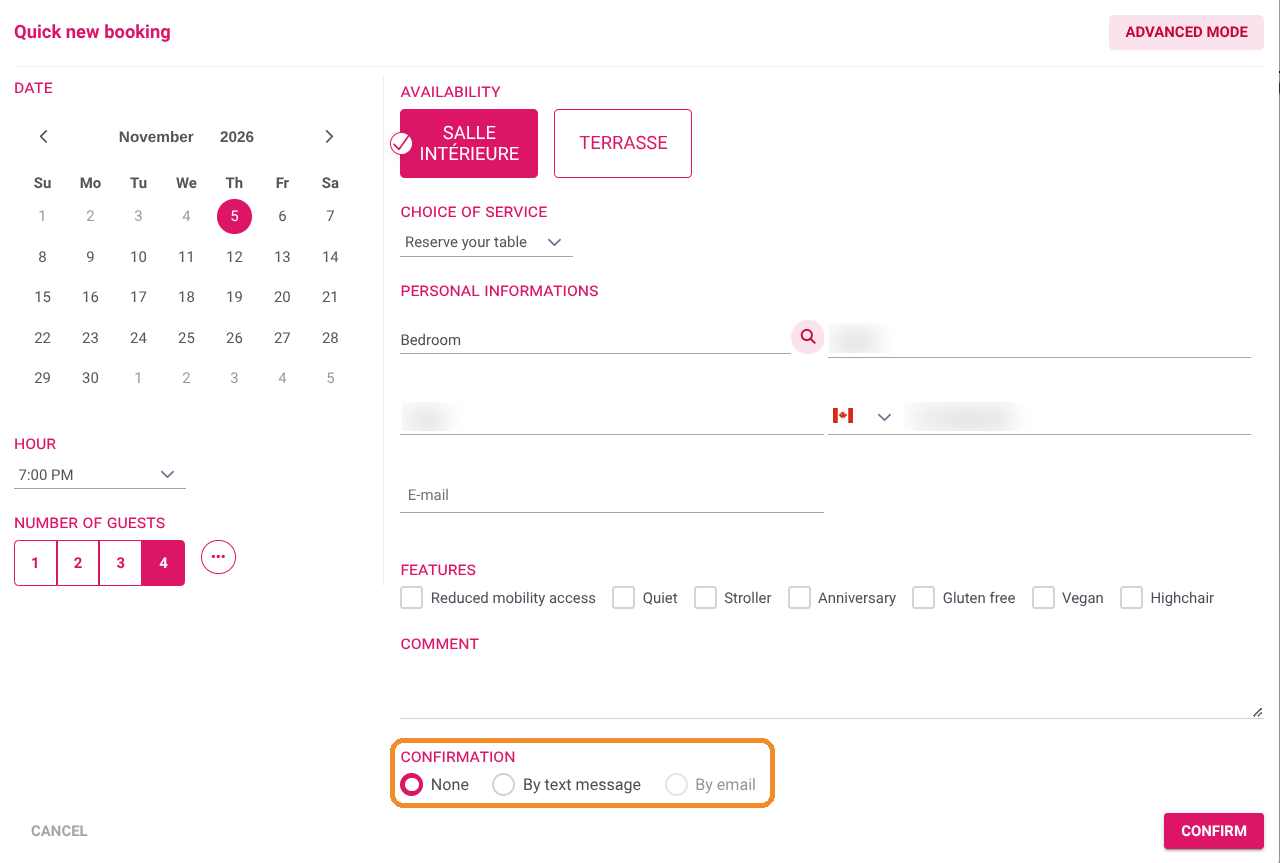
By default, CONFIRMATION is set to None: in this case, only your restaurant receives an email, the guest receives nothing. Remember to choose a sending method for each booking, and for each change.
By email stays greyed out until the guest's email address is entered.
Check that the text message module is active
5. Go to Managing my activity > Property Setup, then in the PROPERTY INFORMATION tile, click GO TO PAGE.
6. Type "sms" in Find a setting: the SMS module section shows whether the module is active (Activation of sms module), whether the guest receives text messages (Send sms to pax.) and whether your property receives them too (Send sms to the establishment.).

The field Code replacing the telephone number on the SMS is the sender name displayed on the text message (11 characters maximum, no accents, spaces or special characters). To change these settings, contact Reservit support.
Good to know
-
The text message is sent for a confirmed booking, not for a simple request.
-
Bookings made by your guests on your online booking pages receive their confirmation by email, not by text message.
-
When you modify or cancel a booking, the guest may receive a text message to inform them.
-
A table booking made at the same time as a room booking does not trigger a text message to the guest.