Help for use
Auto Light Dark
Auto Light Dark
Breadcrumbs

How to set up "prohibited departure" on Reservit | Block check-outs for your property

Article Summary: This detailed tutorial explains how to set up closed to departures (or blocked check-out days) directly from your Reservit Accommodation interface. You will learn how to restrict guest departures on specific dates using your annual calendar, giving you total control over the length of stays. It is the ideal solution to align your online availability with your operational capacity and optimize the management of your booking schedules.

The 4 key steps to apply closed to departures:

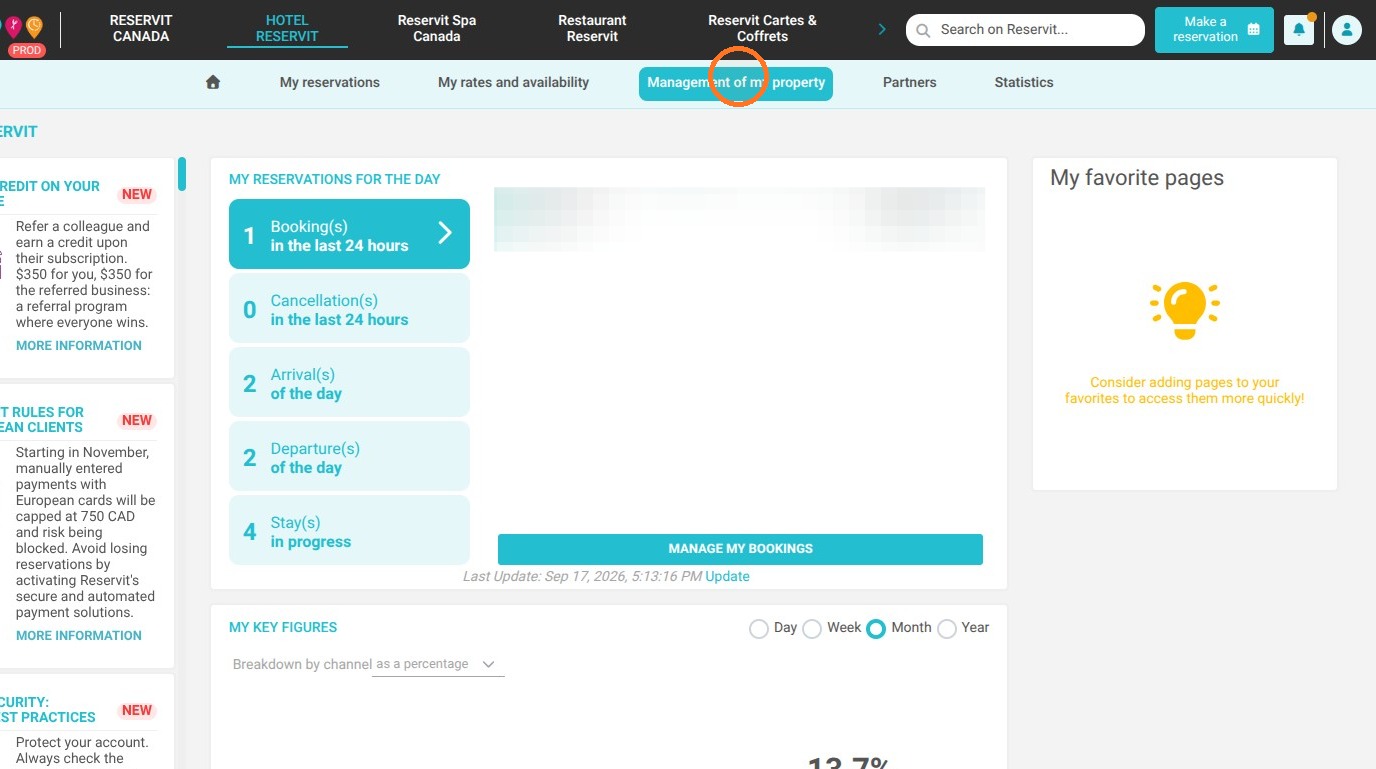
  1. Access restrictions: In your main menu, click on "My property management", select "Property configuration", then go to the "My restrictions" tab.

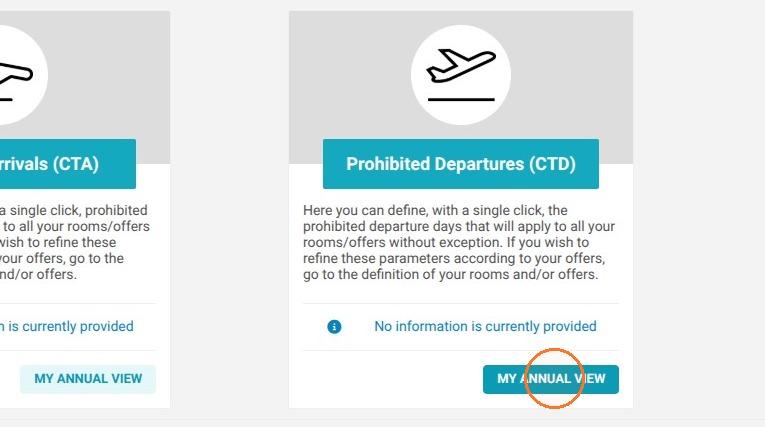
  2. Open the annual view: Locate the section dedicated to departure restrictions and click on the "MY ANNUAL VIEW" button to display your calendar.

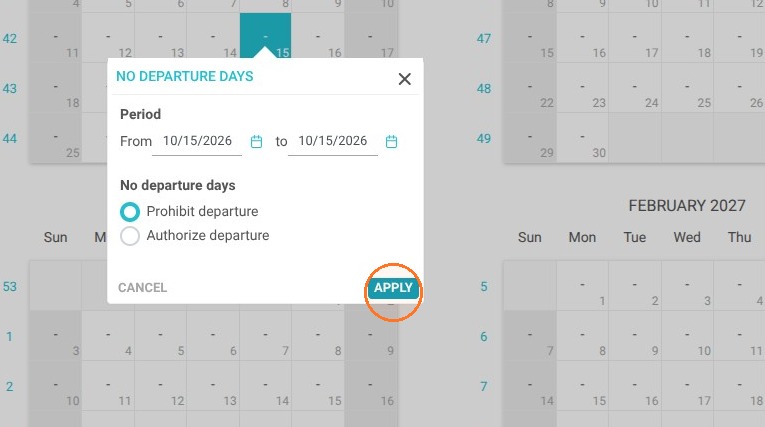
  3. Select the dates to block: Simply click on the calendar days for which you want to prohibit check-outs, then click on "Apply".

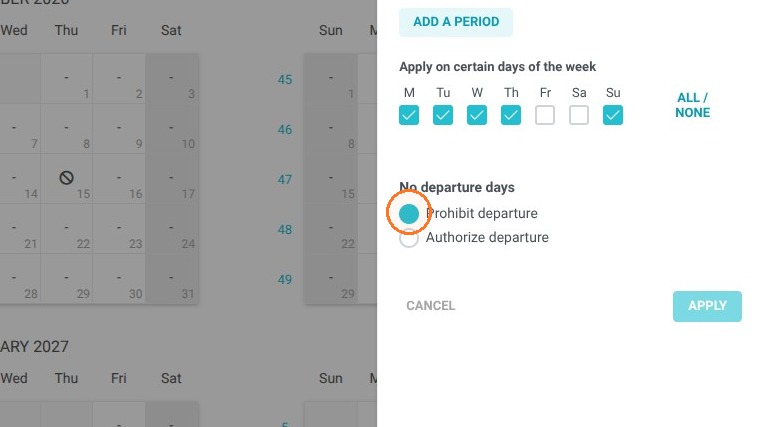
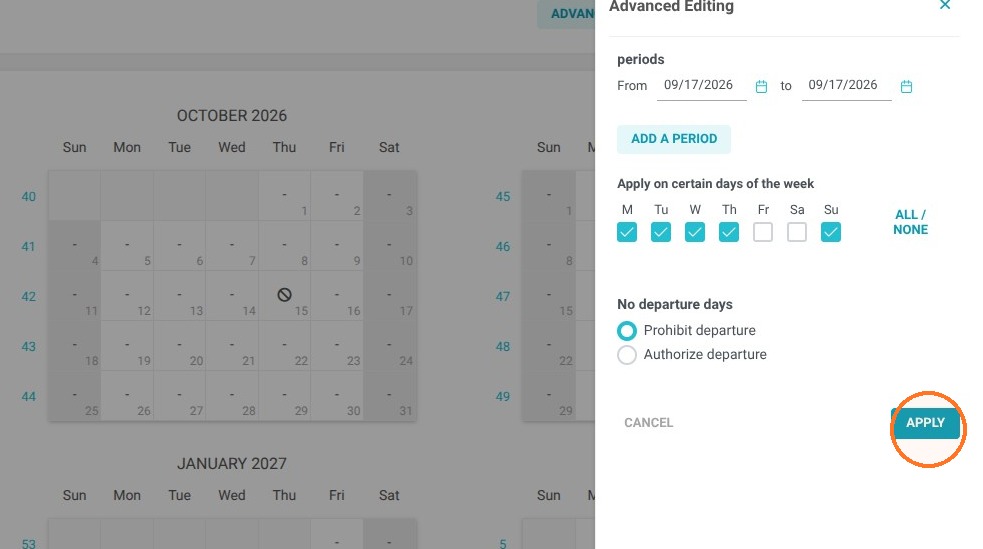
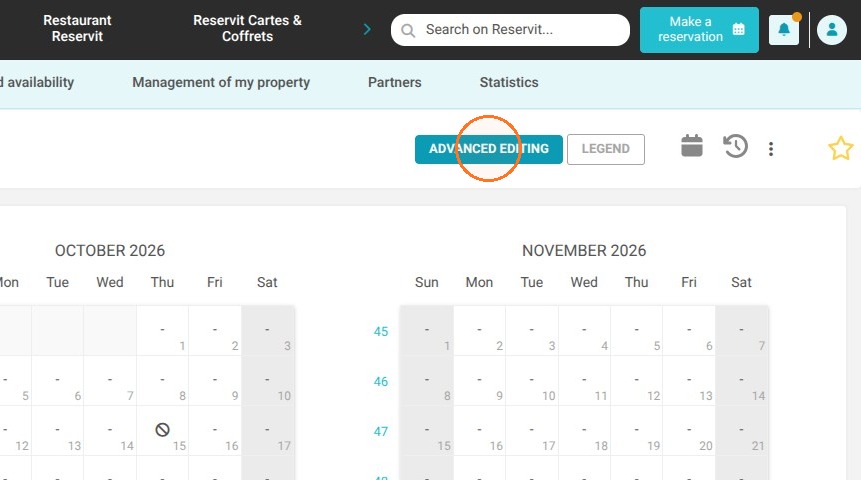
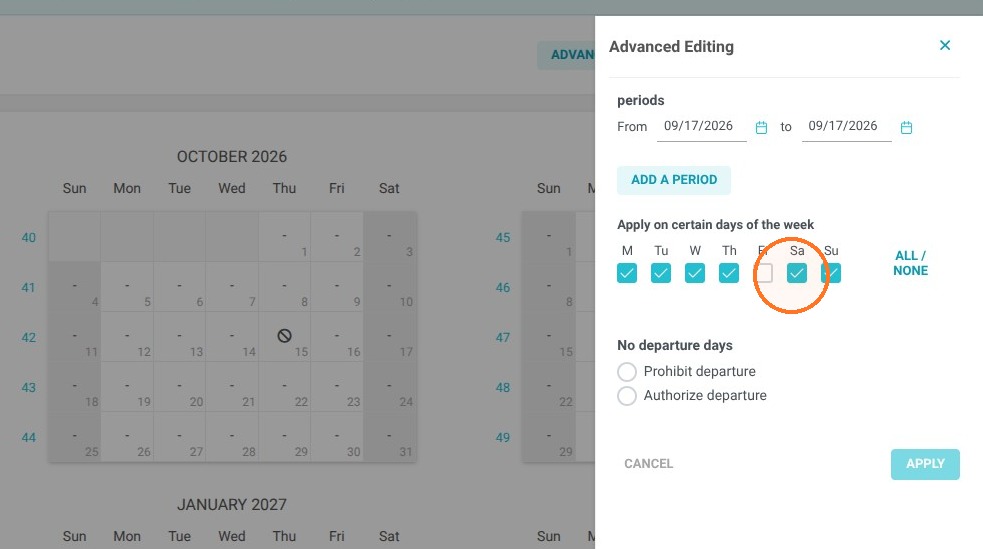
  4. Manage multiple periods: Use the "Advanced modification" option to configure these restrictions simultaneously across multiple days or longer periods, making sure to always save your changes.

Why follow this guide? Following this tutorial allows you to streamline the organization of your housekeeping and reception staff by preventing check-outs on your closed days or when you are understaffed. It is an essential strategic setting that helps you avoid operational management errors and ensures a booking cycle that is perfectly adapted to your constraints.

1. Click "Management of my property"
https://colony-recorder.s3.us-west-1.amazonaws.com/files/2026-09-17/df791420-0e54-4d41-a56b-aeddd155b16a/user_cropped_screenshot_13083857f1fa4d358541716d95585b05_text_export.jpeg

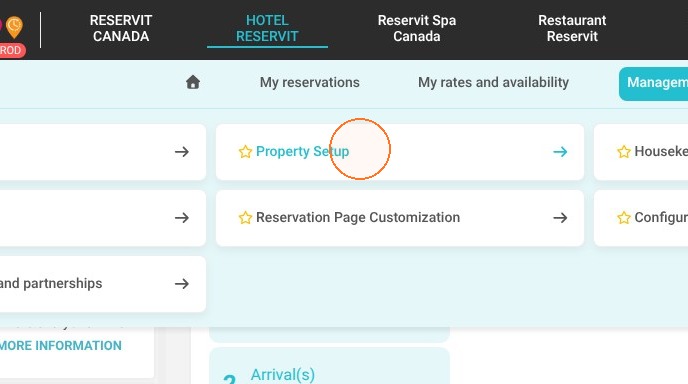
2. Click "Property Setup"

https://colony-recorder.s3.us-west-1.amazonaws.com/files/2026-09-17/69368752-e8a7-40e1-b6d5-357425b307f1/action-9ef3f42547444e9289a9ca4b838381ff_78b6a777a9034ffe9cb2b46ece688f30_text_export.jpeg

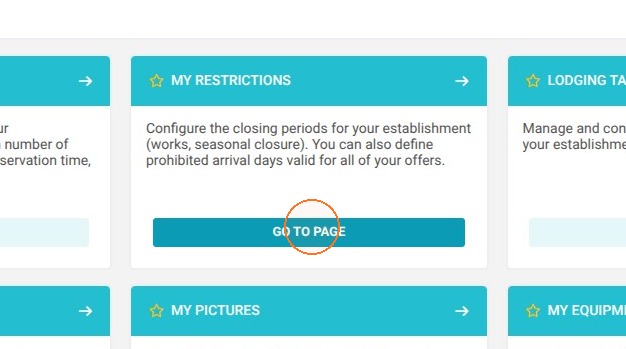
3. Click ''My restrictions''

https://colony-recorder.s3.us-west-1.amazonaws.com/files/2026-09-17/fe3e11cd-64d5-4c1d-830c-325d96cff2dd/action-8664ee5e842247e3bc852dda727761f9_13345e60cf02493d85505b04bc8878f3_text_export.jpeg

4. Click "My annual view" for Prohibited Departures (CTD).
https://colony-recorder.s3.us-west-1.amazonaws.com/files/2026-09-17/87d556d3-8d25-4751-a0fb-c1e05854fdbf/action-db3f02db427b49d4b033eb67cd433c65_68a78b22e6854dfc98b8ccf006cd3a4d_text_export.jpeg

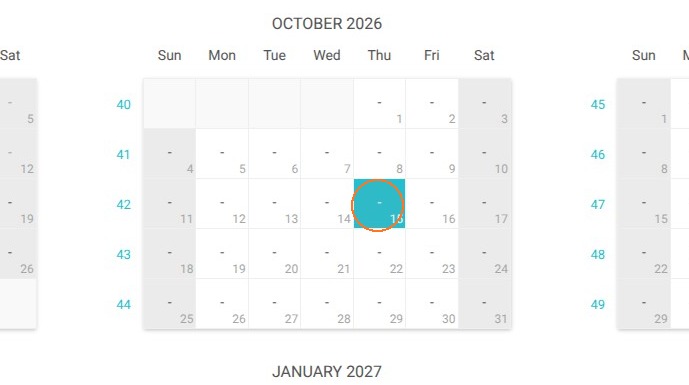
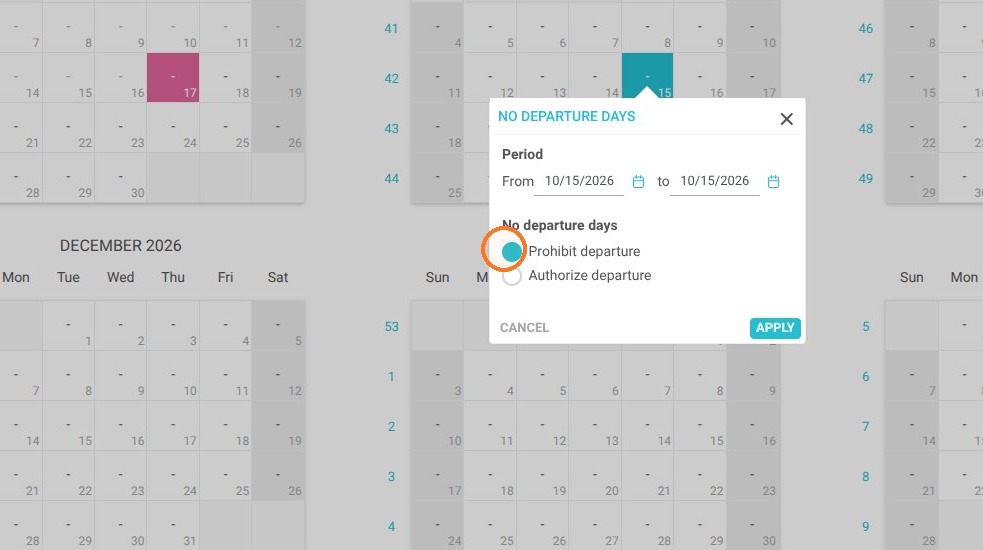
5. Select a date for which departure is not allowed and click on "Apply"
Click "Apply"

https://colony-recorder.s3.us-west-1.amazonaws.com/files/2026-09-17/6eb1429a-e2b6-4e8f-b4c8-0798578e53ca/action-13ab046f4188400bac55f124da85ac3e_f0bff347b2024602b87e9e9f613ac62f_text_export.jpeg
https://colony-recorder.s3.us-west-1.amazonaws.com/files/2026-09-17/ac7c3731-fc4f-4c36-8e9b-a78c7773de3a/action-ffbb54d6b43341cfb2e1fdf4f51ca320_7cd57c67737640fa900bf4c8c1f1d918_text_export.jpeg
https://colony-recorder.s3.us-west-1.amazonaws.com/files/2026-09-17/cb56f31e-25a3-452b-8450-90e3e18ccb45/action-e5b16159b3bb4fc8a86df8b283804103_480e2f484a344c6bbe500f8f4462e4b3_text_export.jpeg

6. You will be able to use the "Advanced modification" feature to make changes across multiple periods / days. Make sure to click on "Apply" to save.
https://colony-recorder.s3.us-west-1.amazonaws.com/files/2026-09-17/14891b51-0ac5-48ef-9747-e70238d31b1e/action-ed25f72502ec4756a8322754d2e257fe_d5a51ffc5c584b72b364f90a0423b1ca_text_export.jpeg
https://colony-recorder.s3.us-west-1.amazonaws.com/files/2026-09-17/17cef2a6-09dd-4e1b-9a6a-8989834ff6aa/action-e06ec386840e42038f193b14fc035520_93a7f3c488dc4946b6bb2810bf52e113_text_export.jpeg
https://colony-recorder.s3.us-west-1.amazonaws.com/files/2026-09-17/6039490c-fd02-4adf-b363-7a63800cb8f0/action-b86c039e2cd244b9bd01087191323b48_2f81b694eef64360bdcb16778cbbd9b0_text_export.jpeg
https://colony-recorder.s3.us-west-1.amazonaws.com/files/2026-09-17/89ee7389-59dc-421c-ba57-cd83e9d4a2f5/action-3e66bec76ea140008e696aa7ac3cb79b_fa0eec9c8ae44e70a30b6bdc45fce979_text_export.jpeg