

Article summary: This tutorial explains how to offer different prices depending on the age of your guests (babies, children, teenagers) and how to show a strikethrough price to highlight a promotion on your booking page.
The 4 key steps:
-
Turn on age groups: choose the age groups to offer in your property setup.
-
Set the ages: enter the maximum age of each group.
-
Enter the prices: in the price of each activity, enter a price per age group.
-
Add a strikethrough price: in the same price, enter the former price to strike through.
Why follow this guide? Family-friendly prices and a clearly visible promotion bring in more bookings, without making booking harder for your guests.
Turn on age groups
1. Go to Managing my activity > Property Setup > Property information, GENERAL section.
2. In Price Management per child, choose the age groups to offer, for example Baby + child + teenager.

3. In the same section, enter the Maximum baby age, the Child maximum age and the Maximum adolescent age, then click Edit at the bottom of the page to save.

Type "price" or "age" in the Find a setting field at the top right to find these settings directly.
The senior group (Senior price management, orange label) is turned on by Reservit. Contact support if you want a senior rate.
Enter prices by age group
4. Go to My rates and availability > Services > SERVICES SETUP > GO TO PAGE, click the activity, then open the Prices tab.
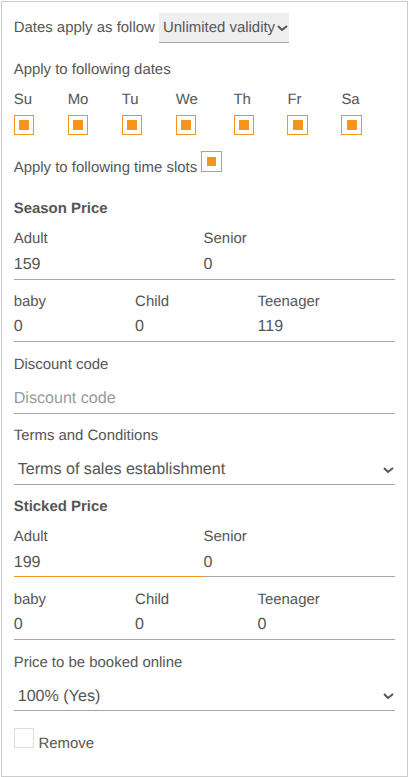
5. In Season Price, enter the Adult price and the price of each active group (baby, Child, Teenager).
6. Click Save at the bottom of the page.
On your booking page, guests then choose the number of participants in each group, and the price is calculated for each one.
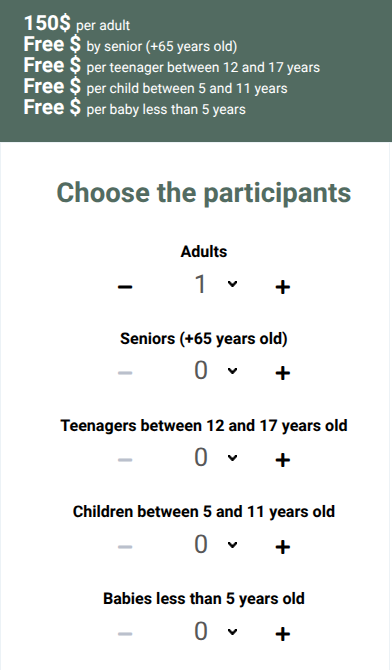
A group left at 0 is shown as "Free" on your booking page, and guests can add it without paying. Enter a price for every group you do not want to offer for free.
Each child counts as a full person in the capacity of your resources.
Add a strikethrough price
7. In the same Prices tab, Sticked Price section, enter the former price of each group concerned (for example $199 for an adult, if the current price is $159).
8. Click Save.
On your booking page, the former price appears struck through next to the current price.
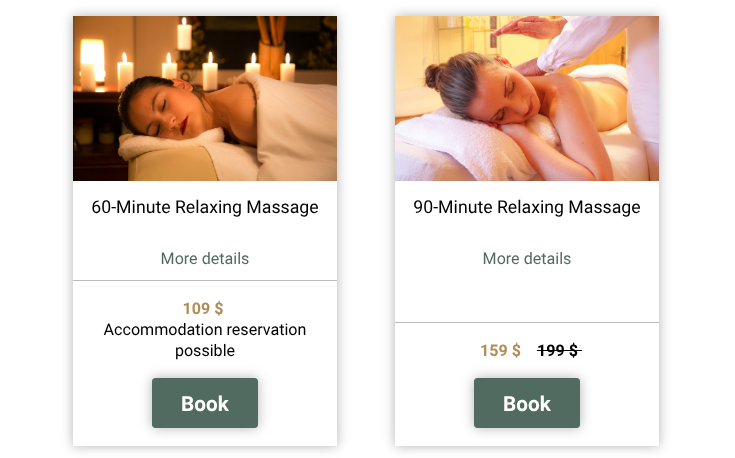
To remove the promotion, set the strikethrough price back to 0 and save.