

Step 1: Verify the nature of the overbooking
First and foremost, you need to determine if it is a lack of availability (Out of Stock) or simply a room assignment issue (Available Stock Decremented).
-
Open the overbooked reservation to bring up the PMS side panel.
-
Click on the three dots (top right corner), then select History.
-
Check the first line:
-
Available Stock Decremented: There was indeed availability when the reservation was created. ➡️ Proceed to Step 2.
-
Out of Stock: This is a genuine overbooking; there are no rooms available. ➡️ Proceed to Step 3.
-
Step 2: "Hotel Tetris" (Reassigning rooms)
If the reservation was integrated into the stock, your availability is simply fragmented. You need to reorganize occupancy to free up a room continuously. You have two methods:
-
Visual Method (Moving): Directly drag and drop other reservations from one room to another on the calendar to create the necessary space.
-
Unassigning Method (very useful if many reservations are blocking the calendar):
-
Click on a reservation that is blocking your calendar.
-
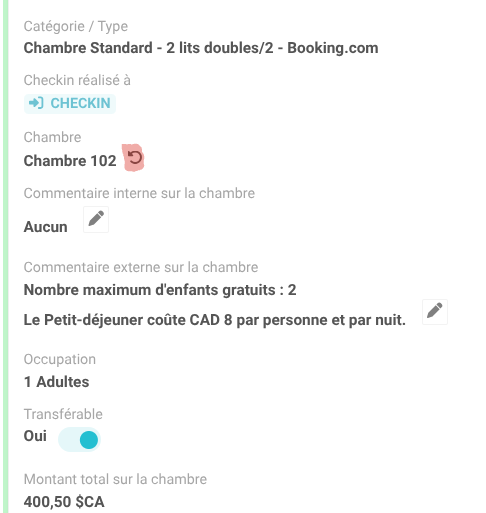
In the right panel (under the assigned room), click Unassign.
Note: This action places the reservation in a temporary overbooked status without releasing the overall inventory. This allows you to place the new reservation, then easily reassign the one you just unassigned. Don't hesitate to repeat this process for multiple reservations to make the final room assignment easier.
-
Step 3: Managing a genuine overbooking (Out of Stock)
If the history shows Out of Stock, the overbooking is real. Several reasons could cause this:
-
A technical issue with a connected partner.
-
Incorrect offer configuration.
-
Incorrect configuration in physical room management.
-
Two reservations created simultaneously (within a few seconds of each other).
Required Action: In all cases of a genuine overbooking, contact our support team. They will investigate the exact cause and advise you on any configurations to change if necessary.
💡 Best Practice: Planning Ahead for Peak Season
During peak season, don't hesitate to set a "Stop sales" on your distributor connections. This way, when you only have a few rooms left, the system will automatically close out the distributors for the relevant dates, greatly reducing the risk of overbooking. In the event of a cancellation, the system will automatically reopen sales.
Contact our team if you would like to set up this configuration.